
R21xx-HP FlexFabric 11900 FCoE Configuration Guide

15
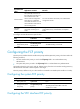
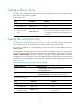
Recommended
value
Application scenarios Remarks
60–90 seconds
Active/standby switchover on
the switch takes more than 2.5 x
60 seconds because of the
amount of FCoE configuration.
ISSU reboot on a dual-MPU
switch takes more than 2.5 x 60
seconds because of the amount
of FCoE configuration.
For more information about ISSU, see Fundamentals
Configuration Guide.
300–600
seconds
ISSU reboot on a single-MPU
switch and connecting to no
nodes.
During such an ISSU reboot, the switch cannot send
unsolicited Discovery Advertisements or keepalive
frames.
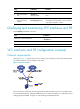
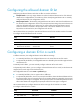
To configure an FKA advertisement period value:
Ste
p
Command
Remarks
1. Enter system view.
system-view N/A
2. Configure an FKA
advertisement period
value.
fcoe fka-adv-period
fka-adv-period
The default setting is 8 seconds.
Configuring the FCF priority
The FCF priority includes the VFC interface FCF priority and the system FCF priority, which are used in the
following scenarios:
• The VFC interface FCF priority is used in the fcf priority field in an unsolicited Discovery
Advertisement.
• The system FCF priority is used in the fcf priority field in a solicited Discovery Advertisement.
An ENode selects the FCF switch with the highest priority from the FCF switches sending Discovery
Advertisements and sends a FLOGI request to it for login.
The FCF priority is effective only on a VFC interface connected to an ENode (VFC interface in F mode).
Configuring the system FCF priority
Ste
p
Command
Remarks
1. Enter system view.
system-view
N/A
2. Configure the system
FCF priority.
fcoe global fcf-priority
priority
The default setting is 128.
The configuration takes effect on all VFC
interfaces in F mode.
Configuring the VFC interface FCF priority