
R21xx-HP FlexFabric 11900 FCoE Configuration Guide

16
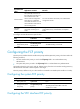
Ste
p
Command
Remarks
1. Enter system view. system-view N/A
2. Enter VFC interface
view.
interface vfc
interface-number
N/A
3. Configure the FCF
priority for the VFC
interface.
fcoe fcf-priority priority
The default setting is 128.
The configuration takes effect on a VFC interface
only when it operates in F mode.
Displaying and maintaining VFC interfaces and FIP
Execute display commands in any view.
Task Command
Display VFC interface information.
display interface [ vfc [ interface-number ] ] [ brief
[ description ] ]
Display FCoE global configuration. display fcoe
Clear the statistics for VFC interfaces. reset counters interface [ vfc [ number ] ]
VFC interfaces and FIP configuration example
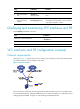
Network requirements
As shown in Figure 12, use the FCoE solution in a data center combining a LAN and a SAN to reduce
the number of devices, network adapters, and cables.
Figure 12 Network diagram
If the FCF switch is connected to the converged network adapter (CNA) of the server or storage device,
PFC and DCBX should be configured additionally on the physical interfaces. For information about
configuring PFC and DCBX, see Layer 2—LAN Switching Configuration Guide.