
R21xx-HP FlexFabric 11900 FCoE Configuration Guide

22
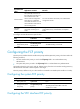
Tasks at a
g
lance
Remarks
(Optional.) Configuring the fabric timers N/A
Building a fabric dynamically
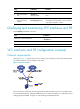
Tasks at a
g
lance
Remarks
(Required.) Configuring a VFC interface N/A
(Required.) Enabling or disabling the fabric configuration
function
To dynamically build a fabric, you must
enable the fabric configuration function.
(Optional.) Setting the switch priority
Principal switch selection relies on the
switch priority.
(Optional.) Configuring the allowed domain ID list N/A
(Optional.) Configuring a domain ID for a switch
When dynamically building a fabric, you
can configure desired domain IDs for
switches.
(Optional.) Configuring the mapping between the N_Port WWN
and the FC address
N/A
(Optional.) Configuring the fabric timers N/A
(Optional.) Configuring the fabric reconfiguration N/A
(Optional.) Configuring a VFC interface to reject incoming RCF
requests
N/A
Enabling or disabling the fabric configuration
function
After being enabled with the fabric configuration function, FCF switches exchange messages to select the
principal switch. Then the principal switch dynamically assigns domain IDs to all switches in the fabric.
Therefore, to dynamically build a fabric, you must enable the fabric configuration function on switches.
To statically set up a fabric, you must disable the fabric configuration function on switches and manually
configure domain IDs for the switches.
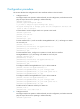
To enable or disable the fabric configuration function:
Ste
p
Command
Remarks
1. Enter system view.
system-view N/A
2. Enter VSAN view.
vsan vsan-id N/A
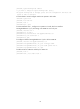
3. Enable the fabric
configuration
function.
domain configure enable
Enable or disable the function for all
switches in the VSAN as required.
By default, the fabric configuration function
is enabled.
4. Disable the fabric
configuration
function.
undo domain configure enable