
R21xx-HP FlexFabric 11900 FCoE Configuration Guide

23
Setting a fabric name
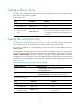
The fabric name configured takes effect only on a statically-built fabric. You must configure the same
fabric name for all switches in a VSAN.
To set a fabric name:
Ste
p
Command
Remarks
1. Enter system view. system-view N/A
2. Enter VSAN view.
vsan vsan-id N/A
3. Configure a fabric
name.
fabric-name name
By default, the fabric name is null.
If the user does not configure a fabric name, the
switch WWN is used as the fabric name after FCoE
is enabled.
Setting the switch priority
The priority value for FCF switches is in the range of 1 to 254. The smaller the value, the higher the
priority. The FCF switch with the highest priority will be elected as the principal switch.
The priority is configured on a per-VSAN basis, and one FCF switch can have different priorities in
different VSANs.
In a stable fabric, the configured priority does not take effect immediately. Therefore, the running priority
of a switch might be different from the configured priority. To validate the configured priority, use the
domain restart disruptive command to perform a disruptive reconfiguration. After a disruptive
reconfiguration, the running priority could still be different from the configured priority. See the following
possibilities on the principal and a non-principal switch, depending on the configured priority value, as
shown in Table 3.
Table 3 Configured priority and run
ning priority mappings
Confi
g
ured
p
riorit
y
Runnin
g
p
riorit
y
≤ 2
• Principal switch—Same as the configured priority.
• Non-principal switch—3.
> 2
• Principal switch—2.
• Non-principal switch—Same as the configured priority.
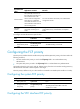
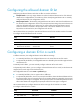
To set the switch priority:
Ste
p
Command
Remarks
1. Enter system view.
system-view N/A
2. Enter VSAN view.
vsan vsan-id N/A
3. Configure a priority
value for the switch.
priority value
By default, the priority value of a
switch is 128.