
R21xx-HP FlexFabric 11900 FCoE Configuration Guide



25
Ste
p
Command
Remarks
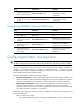
3. Configure a domain ID for
the switch.
domain-id domain-id { preferred |
static }
By default, the domain ID of a switch is
0 and is of the preferred type.
Configuring the mapping between the N_Port
WWN and the FC address
If you bind the WWN of an N_Port to an FC address, when the N_Port requests an FC address, the
switch assigns the bound FC address to it.
The WWN of an N_Port can be bound to only one FC address, and vice versa.
The N-Port here indicates an N_Port on a node or an NP_Port on an NPV switch.
To bind the WWN of an N_Port to an FC address:
Ste
p
Command
Remarks
1. Enter system view.
system-view
N/A
2. Enter VSAN view.
vsan vsan-id N/A
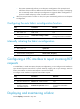
3. Bind the WWN of an
N_Port to an FC address.
wwn wwn-value area-port-id
area-port-id-value
By default, no binding is
configured.
Configuring the fabric timers
The fabric operation involves the following timers:
• Distributed service timeout period
• Error detection timeout period
• Resource allocation timeout period
For more information about these timers, see FC-related protocols and standards.
You can configure fabric timers by using one of the following ways:
• Configure the timers in system view, and the configuration takes effect for all VSANs.
• Configure the timers in VSAN view, and the configuration takes effect for only the VSAN.
If you perform the configuration in both system view and VSAN view, the configuration made in VSAN
view applies to the VSAN.
Configuring the fabric timers in system view
Ste
p
Command
Remarks
1. Enter system view.
system-view N/A
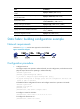
2. Configure the global
distributed service timeout
period.
fc timer distributed-services value
By default, the distributed service
timeout period is 5000
milliseconds.