
R21xx-HP FlexFabric 11900 FCoE Configuration Guide



27
{ The system automatically performs a non-disruptive reconfiguration if the principal switch
information of the two fabrics is different and the domain ID lists are not empty or overlapping.
{ You can manually initiate a disruptive reconfiguration to trigger the fabric reconfiguration if
ports are isolated and priority values of switches are modified.
• When the principal switch in a fabric is down, the system automatically performs a non-disruptive
reconfiguration.
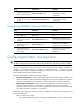
Configuring the auto fabric reconfiguration function
Ste
p
Command
Remarks
1. Enter system view.
system-view N/A
2. Enter VSAN view. vsan vsan-id N/A
3. Enable the auto fabric
reconfiguration function.
domain auto-reconfigure enable
By default, the auto fabric
reconfiguration function is disabled.
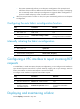
Manually initiating the fabric reconfiguration
Ste
p
Command
1. Enter system view.
system-view
2. Enter VSAN view.
vsan vsan-id
3. Initiate the fabric reconfiguration. domain restart [ disruptive ]
Configuring a VFC interface to reject incoming RCF
requests
In a stable fabric, to avoid unnecessary disruptive reconfigurations, you can configure a VFC interface to
reject the RCF requests received from a specific VSAN by replying with a reject message. With this
feature, the interface on which an RCF request is received is isolated.
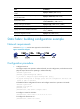
To configure a VFC interface to reject the received RCF requests:
Ste
p
Command
Remarks
1. Enter system view.
system-view N/A
2. Enter VFC interface view. interface vfc interface-number N/A
3. Configure the VFC
interface to reject the
received RCF requests.
fc domain rcf-reject vsan vsan-id
By default, a VFC interface does
not reject the received RCF
requests.
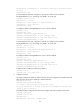
Displaying and maintaining a fabric
Execute display commands in any view.