
R21xx-HP FlexFabric 11900 FCoE Configuration Guide



28
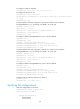
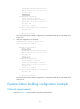
Task Command
Display the domain information of the specified
VSAN.
display fc domain [ vsan vsan-id ]
Display the list of domain IDs dynamically allocated in
the specified VSAN.
display fc domain-list [ vsan vsan-id ]
Display fabric timers.
display fc timer [ distributed-services | error-detect |
resource allocation ] [ vsan vsan-id ]
Display node login information. display fc login [ vsan vsan-id ] [ count ]
Display the SCR table for an N_Port. display fc scr-table [ vsan vsan-id ]
Display name service database information.
display fc name-service database [ vsan vsan-id [ fcid
fcid ] ] [ verbose ]
Display ESS negotiation results. display fc ess [ vsan vsan-id ]
Static fabric building configuration example
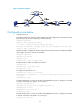
Network requirements
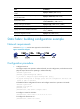
As shown in Figure 14, use the static approach to build a fabric.
Figure 14 Network diagram
Configuration procedure
1. Configure Switch A:
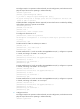
# Configure Switch A to operate in advanced mode, save the configuration, and reboot Switch A.
(Skip this step if the switch is operating in advanced mode.)
<SwitchA> system-view
[SwitchA] system-working-mode advance
Do you want to change the system working mode? [Y/N]:y
The system working mode is changed, please save the configuration and reboot the
system to make it effective.
# Disable the fabric configuration function and configure Switch A to operate in FCF mode.
<SwitchA> system-view
[SwitchA] fcoe-mode fcf
[SwitchA] vsan 1
[SwitchA-vsan1] undo domain configure enable
# Configure a name for the fabric.
[SwitchA-vsan1] fabric-name 11:11:11:11:11:11:11:11
# Configure the domain ID as 1.
[SwitchA-vsan1] domain-id 1 static