
R21xx-HP FlexFabric 11900 FCoE Configuration Guide



32
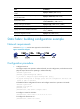
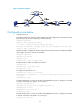
Figure 15 Network diagram
Configuration procedure
1. Configure Switch A:
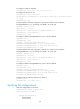
# Configure Switch A to operate in advanced mode, save the configuration, and reboot Switch A.
(Skip this step if the switch is operating in advanced mode.)
<SwitchA> system-view
[SwitchA] system-working-mode advance
Do you want to change the system working mode? [Y/N]:y
The system working mode is changed, please save the configuration and reboot the
system to make it effective.
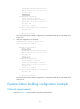
# Enable the fabric configuration function (optional, because this function is enabled by default),
and configure Switch A to operate in FCF mode.
<SwitchA> system-view
[SwitchA] fcoe-mode fcf
[SwitchA] vsan 1
[SwitchA-vsan1] domain configure enable
# Enable FCoE for VLAN 10 and map it to VSAN 1.
[SwitchA] vlan 10
[SwitchA-vlan10] fcoe enable vsan 1
[SwitchA-vlan10] quit
# Configure the domain ID as 11.
[SwitchA-vsan1] domain-id 11 preferred
Non-disruptive reconfiguration or isolating the switch may be performed. Continu
e? [Y/N]:y
[SwitchA-vsan1] quit
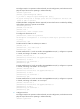
# Create interface VFC 2, bind it to interface Ten-GigabitEthernet 4/0/2, configure it to operate
in E mode, and assign it to VSAN 1 as a trunk port.
[SwitchA] interface Vfc 2
[SwitchA-Vfc2] bind interface ten-gigabitethernet4/0/2
[SwitchA-Vfc2] fc mode e
[SwitchA-Vfc2] port trunk vsan 1
[SwitchA-Vfc2] quit
# Create interface VFC 1, bind it to interface Ten-GigabitEthernet 4/0/1, configure it to operate
in E mode, and assign it to VSAN 1 as a trunk port.
[SwitchA] interface Vfc 1