
R21xx-HP FlexFabric 11900 FCoE Configuration Guide

38
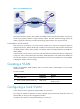
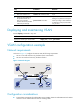
Figure 16 Trunk VSAN network
During the transmission process, VFT_Headers are added to and removed from the frames. A switch can
use the same physical interface to support multiple VSANs. The trunk VSAN technology reduces the
number of physical connections, actually implementing logical isolation in a physical network.
Trunk VSAN in an FCoE network
FCoE carries FC over Ethernet. In an FCoE network, VSANs in FC need to be mapped to VLANs as
configured by the user, and the FIB table for a VSAN is also stored on the relevant VLAN. FCoE frames
use VLAN_Header in place of VFT_Header in FC packets and are forwarded based on the VLAN ID in
VLAN_Header.
A VFC interface can only work as a trunk port. The bound Ethernet interface must also be configured as
a trunk port, and its trunk VLAN list must include the VLANs mapped to each VSAN in the VSAN trunk
list of the VFC interface. An FCoE frame transmitted from a VFC can use the VLAN ID in VLAN_Header
to identify the VLAN to which it belongs.
Creating a VSAN
Initially, only the default VSAN (VSAN 1) exists. You cannot create or delete VSAN 1. You can create
VSANs 2 to 3839.
To create a VSAN:
Ste
p
Command
Remarks
1. Enter system view. system-view N/A
2. Create a VSAN and enter VSAN view.
vsan vsan-id
By default, only the default VSAN
(VSAN 1) exists.
Configuring a trunk VSAN
A VFC interface can be assigned to multiple VSANs as a trunk port.
If you assign an interface to VSANs as a trunk port multiple times, the final trunk VSAN list is the set of
all the VSANs to which you have assigned the interface.
To assign a VFC interface to the specified VSANs as a trunk port:
F_Port
F_Port
F_Port
F_Port
N_Port
N_Port
N_Port
N_Port
VSAN 1
E_Port
E_Port
VSAN 1
VSAN 2
VSAN 2
FC Fabric
Server A
Server B
Disk A
Disk B
FC switch B
FC switch A