
R21xx-HP FlexFabric 11900 FCoE Configuration Guide

39
Ste
p
Command
Remarks
1. Enter system view. system-view N/A
2. Enter VFC interface view.
interface vfc interface-number N/A
3. Assign the VFC interface to
the specified VSANs as a
trunk port so that the
interface allows the specified
VSANs to pass through.
port trunk vsan vsan-id-list
By default, a VFC interface does not
belong to any VSAN as a trunk port.
When you assign a VFC interface to
a VSAN as a trunk port, the VSAN
may not exist.
Displaying and maintaining VSAN
Execute display commands in any view.
Task Command
Display the member ports of the VSAN. display vsan [ vsan-id ] port-member
VSAN configuration example
Network requirements
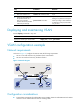
As shown in Figure 17, configure the SAN to meet the following requirements:
• Server A can read and write only the data of Disk A and Disk B.
• Server B can read and write only the data of Disk C.
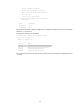
Figure 17 Network diagram
Configuration considerations
• To meet these requirements, divide the SAN into two VSANs, VSAN 10 and VSAN 20. Each VSAN
contains a server and disk devices that can exchange data.