
R21xx-HP FlexFabric 11900 FCoE Configuration Guide
41
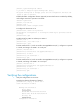
# Create interface VFC 100 (uplink interface), bind it to interface Ten-GigabitEthernet 1/0/3,
configure it to operate in E mode, and assign it to VSANs 10 and 20 as a trunk port.
[SwitchA] interface Vfc 100
[SwitchA-Vfc102] bind interface Ten-GigabitEthernet1/0/3
[SwitchA-Vfc100] fc mode e
[SwitchA-Vfc100] port trunk vsan 10 20
2. Configure Switch B in the same way Switch A is configured. (Details not shown.)
Verifying the configurations
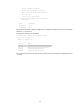
1. Verify the configurations on Switch A by displaying member interfaces of all VSANs.
[SwitchA- Vfc100] display vsan port-member
VSAN 1:
Access Ports:
Trunk Ports:
VSAN 10:
Access Ports:
Trunk Ports:
Vfc 100
Vfc 102
VSAN 20:
Access Ports:
Trunk Ports:
Vfc 100
Vfc 102
2. Verify the configurations on Switch B.
The output on Switch B is the same as that on Switch A.