
R21xx-HP FlexFabric 11900 FCoE Configuration Guide


46
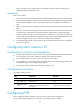
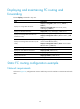
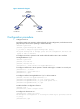
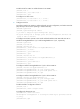
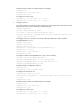
FSPF configuration task list
Tasks at a
g
lance
Change FSPF parameters for a VSAN in VSAN view:
• (Required.) Enabling FSPF
•
(Optional.) Configuring the shortest SPF calculation interval
• (Optional.) Configuring the minimum LSR receiving interval
• (Optional.) Configuring the minimum LSR refresh interval
(Optional.) Change FSPF parameters for an interface in E_Port interface view:
• Configuring the FSPF cost for an interface
• Configuring the hello interval for an interface
• Configuring the dead interval for an interface
• Configuring the LSR retransmission interval for interfaces
• Disabling FSPF for an interface
(Optional.) Configuring FSPF GR in system view:
• Configuring the GR Restarter
• Configuring the GR Helper
Enabling FSPF
FSPF-related functions can work in a VSAN only after you enable FSPF for the VSAN.
To enable FSPF:
Ste
p
Command
Remarks
1. Enter system view.
system-view N/A
2. Enter VSAN view. vsan vsan-id N/A
3. Enable FSPF for the VSAN.
fspf enable
By default, FSPF is enabled after a VSAN is
created.
Configuring the shortest SPF calculation interval
When the LSDB changes, SPF calculations occur, which consume CPU resources. To prevent frequent SPF
calculations from consuming too many CPU resources, you can configure the shortest SPF calculation
interval.
The shortest SPF calculation interval defines the minimum interval between two consecutive SPF
calculations. A smaller value means that FSPF responds faster to fabric changes by recalculating routes
in a VSAN, but it requires more CPU resources.
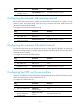
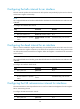
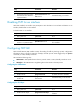
To configure the shortest SPF calculation interval:
Ste
p
Command
Remarks
1. Enter system view.
system-view N/A
2. Enter VSAN view. vsan vsan-id N/A