
R21xx-HP FlexFabric 11900 FCoE Configuration Guide


48
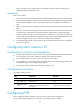
Configuring the hello interval for an interface
The hello interval specifies the time between the hello packets sent periodically by the switch to discover
and maintain neighbor relationships.
NOTE:
The configured hello interval must be smaller than the dead interval and must be the same at the two ends
of the link.
To configure the interface hello interval:
Ste
p
Command
Remarks
1. Enter system view.
system-view N/A
2. Enter VFC interface view. interface vfc interface-number
N/A
3. Configure the hello interval for
the VFC interface in a specified
VSAN.
fspf hello-interval value vsan
vsan-id
The default setting is 20 seconds.
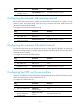
Configuring the dead interval for an interface
After two switches establish a neighbor relationship, they send hello packets at the hello interval to each
other to maintain the neighbor relationship. The dead interval specifies the interval during which at least
one hello packet must be received from a neighbor before the neighbor is considered to be nonexistent
and is removed.
NOTE:
The configured dead interval must be greater than the hello interval and must be the same at the two ends
of the link.
To configure the interface dead interval:
Ste
p
Command
Remarks
1. Enter system view.
system-view N/A
2. Enter VFC interface view. interface vfc interface-number
N/A
3. Configure the dead interval for
the VFC interface in a specified
VSAN.
fspf dead-interval value vsan
vsan-id
The default setting is 80 seconds.
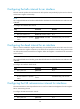
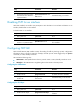
Configuring the LSR retransmission interval for interfaces
The LSR retransmission interval specifies the time to wait for an LSR acknowledgement from the neighbor
before retransmitting the LSR.
To configure the LSR retransmission interval:
Ste
p
Command
Remarks
1. Enter system view. system-view N/A