
R21xx-HP FlexFabric 11900 FCoE Configuration Guide


50
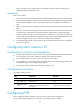
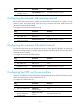
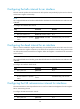
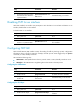
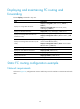
Displaying and maintaining FC routing and
forwarding
Execute display commands in any view.
Task Command
Display FC routing table information.
display fc routing-table [ vsan vsan-id ] [ statistics |
verbose ]
display fc routing-table vsan vsan-id fc-id [ mask |
mask-length ] [ verbose ]
Display FC FIB table information. display fc fib [ fcid [ mask-length ] ] vsan vsan- id
Display FC Exchange table information (in
standalone mode).
display fc exchange { link | protocol } [ slot slot-number ]
display fc exchange link verbose [ slot slot-number ] [ exid
exid ]
Display FC Exchange table information (in IRF
mode).
display fc exchange { link | protocol } [ chassis
chassis-number slot slot-number ]
display fc exchange link verbose [ chassis chassis-number
slot slot-number ] [ exid exid ]
Display FSPF neighbor information. display fspf neighbor [ vsan vsan-id ]
Display link state database information. display fspf lsdb [ vsan vsan-id ]
Display FSPF GR state information. display fspf graceful-restart [ vsan vsan-id ]
Display FSPF statistics. display fspf statistics [ vsan vsan-id ]
Clear FSPF statistics. reset fspf counters [ vsan vsan-id ]
Static FC routing configuration example
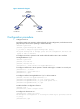
Network requirements
As shown in Figure 18, configure static routes to enable any two FCF switches to communicate with each
other.