
R21xx-HP FlexFabric 11900 FCoE Configuration Guide


65
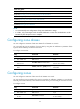
Tasks at a
g
lance
(Required.) Configuring zone distribution and merge types
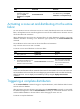
(Required.) Activating a zone set and distributing it to the entire fabric
(Optional.) Triggering a complete distribution
(Optional.) Renaming zone aliases, zones, and zone sets
(Optional.) Copying zone aliases, zones, and zone sets
(Optional.) Deleting the zone database
NOTE:
• You cannot modify zone configurations during zone distribution or merge.
• In a fabric, only one manager switch can initiate distribution at a time. The next distribution can be
initiated only after the previous one is complete.
Configuring zone aliases
You can configure a maximum of 256 zone aliases for all VSANs on a switch.
You can specify N_Ports as members of a zone alias by using their FC addresses or pWWNs. These
N_Ports can be indirectly connected to the switch.
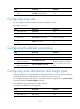
To configure a zone alias:
Ste
p
Command
Remarks
1. Enter system view.
system-view N/A
2. Enter VSAN view. vsan vsan-id N/A
3. Create a zone alias and
enter its view.
zone-alias name zone-alias-name
If the zone alias has been created,
enter its view directly.
4. Add a member to the zone
alias.
member { fcid fcid | pwwn pwwn }
By default, no member exists in a
zone alias.
Configuring zones
You can configure a maximum of 512 zones for all VSANs on a switch.
You can specify N_Ports as members of a zone by using their FC addresses, pWWNs, or zone aliases.
These N_Ports can be indirectly connected to the switch. An N_Port can belong to more than one zone.
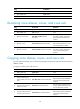
To configure a zone:
Ste
p
Command
Remarks
1. Enter system view.
system-view N/A
2. Enter VSAN view. vsan vsan-id N/A
3. Create a zone and enter
its view.
zone name zone-name
If the zone has been created, enter
its view directly.