
R21xx-HP FlexFabric 11900 FCoE Configuration Guide


75
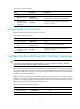
To configure an uplink interface:
Ste
p
Command
Remarks
1. Enter system view.
system-view N/A
2. Enter VFC interface
view.
interface vfc
interface-number
This interface is connected to the core switch.
3. Configure the VFC
interface to operate
in NP mode.
fc mode np
By default, a VFC interface on an NPV switch
operates in F mode.
Configuring downlink interfaces
Downlink interfaces must be VFC interfaces in F mode.
To configure a downlink interface:
Ste
p
Command
Remarks
1. Enter system view.
system-view N/A
2. Enter VFC interface
view.
interface vfc
interface-number
This interface is connected to a node.
3. Configure the VFC
interface to operate
in F mode.
fc mode f
By default, a VFC interface on an NPV switch
operates in F mode.
Configuring downlink-to-uplink interface mappings
CAUTION:
If an uplink interface mapped by a downlink interface is not in the configured mappings, the switch
initializes the downlink interface, resulting in traffic interruption.
NPV switches automatically map downlink interfaces to uplink interfaces. When automatic mapping
cannot meet requirements, for example, when a downlink interface must be connected to a fabric
through a specified uplink interface, you can manually map the downlink interface to a specified uplink
interface or a set of uplink interfaces.
After you configure the mapping, the downlink interface can be mapped to only the configured uplink
interfaces. If none of the configured uplink interfaces is operational, the downlink interface cannot be
operational. A configured mapping selects the uplink interface with the minimum load from configured
uplink interfaces and then maps the downlink interface to it.
To configure uplink and downlink mapping:
Ste
p
Command
Remarks
1. Enter system view.
system-view N/A
2. Enter VSAN view.
vsan vsan-id N/A