
R21xx-HP FlexFabric 11900 Fundamentals Command Reference



96
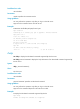
Predefined user roles
network-admin
Parameters
remotefile: Specifies a directory or file on the FTP server.
Usage guidelines
You can perform this operation only after you log in to the FTP server.
Support for this command and output of this command depends on the FTP server model.
Examples
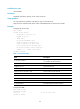
# Display FTP server status.
ftp> rstatus
211-FTP server status:
Connected to 192.168.20.177
Logged in as root
TYPE: ASCII
No session bandwidth limit
Session timeout in seconds is 300
Control connection is plain text
Data connections will be plain text
At session startup, client count was 1
vsFTPd 2.0.6 - secure, fast, stable
211 End of status
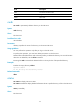
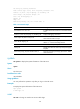
Table 11 Command output
Filed Descri
p
tion
211-FTP server status:
Beginning of the display of FTP server status, where
211 specifies the FTP command.
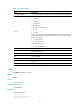
Connected to 192.168.20.177 IP address of the FTP client.
Logged in as root Login username root.
TYPE: ASCII File transfer mode ASCII.
Session timeout in seconds is 300 Timeout interval is 300 seconds.
Control connection is plain text Control connection type is plain text.
Data connections will be plain text Data connection type is plain text.
At session startup, client count was 1 FTP connection number is 1.
vsFTPd 2.0.6 - secure, fast, stable FTP version is 2.0.6.
211 End of status End of the display of FTP server status.
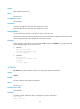
# Display file a.txt.
ftp> rstatus a.txt
213-Status follows:
-rw-r--r-- 1 0 0 80 Jul 18 02:58 a.txt
213 End of status