
R21xx-HP FlexFabric 11900 Fundamentals Command Reference

108
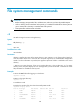
File system management commands
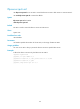
IMPORTANT:
• Before managing storage media, files, and directories, make sure you know the possible impacts.
• A file or directory whose name starts with a period (.) is considered a hidden file or directory. Do no
t
give a common file or directory a name that starts with a period.
• Some system files and directories are hidden.
cd
Use cd to change the current working directory.
Syntax
cd { directory | .. }
Views
User view
Predefined user roles
network-admin
Parameters
directory: Specifies the name of the target directory, case insensitive, in the format [drive:/]path. For
more information about how to enter the drive and path arguments, see Fundamentals Configuration
Guide. If no drive information is provided, the argument represents a folder or subfolder in the current
directory.
..: Returns to an upper directory. If the current working directory is the root directory, or if no upper
directory exists, the system displays an error message when you execute the cd .. command. No online
help information is available for this keyword.
Examples
# Access the test folder after logging in to the device.
<Sysname> cd test
# Return to the upper directory.
<Sysname> cd ..
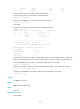
In standalone mode:
# Display the number of the slot where the standby MPU resides.
<Sysname> display device
Slot No. Brd Type Brd Status Subslot Num Sft Ver Patch Ver
0 NONE Absent 0 NONE None
1 NONE Absent 0 NONE None
2 LSU1TGS48SF9 Normal 0 11900-2105 None
3 NONE Absent 0 NONE None
4 LSU1SUPB9 Master 0 11900-2105 None