
R21xx-HP FlexFabric 11900 Fundamentals Command Reference
122
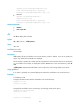
Related commands
delete
rmdir
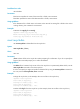
Use rmdir to remove a folder.
Syntax
rmdir directory
Views
User view
Predefined user roles
network-admin
Parameters
directory: Specifies a folder name, case insensitive.
Usage guidelines
To remove a directory, you must delete all files and subfolders in the directory permanently or move them
to the recycle bin. If you move them to the recycle bin, executing the rmdir command permanently deletes
them.
Examples
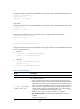
# Remove the subtest folder.
<Sysname>rmdir subtest/
Remove directory flash:/test/subtest and the files in the recycle-bin under this directory
will be deleted permanently. Continue?[Y/N]:y
Directory flash:/test/subtest removed.
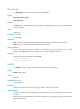
undelete
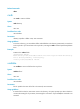
Use undelete to restore a file from the recycle bin.
Syntax
undelete file-url
Views
User view
Predefined user roles
network-admin
Parameters
file-url: Specifies the name of the file to be restored, case insensitive.
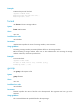
Usage guidelines
If another file that has the same name exists in the directory, the system prompts you about whether to
overwrite the existing file. If you enter Y, the existing file is overwritten. If you enter N, the command is not
executed.