
R21xx-HP FlexFabric 11900 Fundamentals Command Reference

131
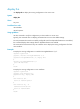
reset saved-configuration
Use reset saved-configuration to delete next-startup configuration files.
Syntax
reset saved-configuration [ backup | main ]
Views
User view
Predefined user roles
network-admin
Parameters
backup: Deletes the backup next-startup configuration file.
main: Deletes the main next-startup configuration file.
Usage guidelines
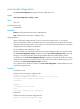
Delete a next-startup configuration file if it does not match the software version or is corrupted.
Use this command with caution. In standalone mode, this command permanently deletes the next-startup
configuration files from both MPUs. In IRF mode, this command permanently deletes the next-startup
configuration files on all MPUs in the IRF fabric.
You can delete the main, the backup, or both.
To delete a file that is set as both main and backup next-startup configuration files, you must execute both
the reset saved-configuration backup command and the reset saved-configuration main command.
Using only one of the commands removes the specified file attribute instead of deleting the file.
For example, if the reset saved-configuration backup command is executed, the backup next-startup
configuration file setting is set to NULL, but the file is still used as the main file. To delete the file, you must
also execute the reset saved-configuration main command.
If no configuration file attribute is specified, the reset saved-configuration command deletes the main
next-startup configuration file.
Examples
In standalone mode:
# Delete the main next-startup configuration file.
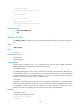
<Sysname> reset saved-configuration
The saved configuration file will be erased. Are you sure? [Y/N]:y
Configuration file in flash is being cleared.
Please wait ...
..
MainBoard:
Configuration file is cleared.
Slot 1:
Erase next configuration file successfully
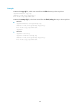
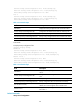
In IRF mode:
# Delete the backup next-startup configuration file.
<Sysname> reset saved-configuration backup