
R21xx-HP FlexFabric 11900 Fundamentals Command Reference


185
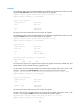
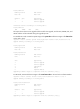
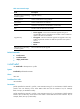
Table 24 Command output
Field Description
Upgrade summary according
to following table
Upgrade summary.
Running Version Version number of the running software.
New Version Version number of the new software.
Chassis Member ID of the device in the IRF fabric. (In IRF mode.)
Slot Number of the slot where the card resides.
Upgrade Way
ISSU methods:
• Service Upgrade—Service-level incremental upgrade. This type of
upgrade affects only the upgraded service modules. It does not affect the
system or the other service modules.
• File Upgrade—File-level incremental upgrade. The upgrade involves only
hidden program files and does not affect the operation of the system or
services.
• ISSU Reboot.
• Reboot.
Influenced service according
to following table
Services influenced by the upgrade.
Related commands
• install commit
• install deactivate
• display install active
install add
Use install add to decompress a .ipe file.
Syntax
install add ipe-file medium-name:
Views
User view
Predefined user roles
network-admin
Parameters
ipe-file: Specifies the name of a .ipe file, a case-insensitive string of 1 to 63 characters. This file must be
saved in the root directory of the active MPU's Flash and use the extension .bin, for example,
flash:/new.ipe. (In standalone mode.)
ipe-file: Specifies the name of a .ipe file, a case-insensitive string of 1 to 63 characters. This file must be
saved in the root directory of the Flash on the master's active MPU and use the extension .bin, for
example, flash:/new.ipe. (In IRF mode.)