
R21xx-HP FlexFabric 11900 Fundamentals Command Reference

191
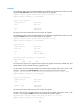
Verifying packages on slot 5:
Start to check active package completeness.
flash:/boot-a0101.bin verification successful.
flash:/system-a0101.bin verification successful.
Start to check active package consistency.
Active packages are consistent with committed packages on their own board.
Active packages are consistent with the reference packages.
Verification is done.
# In IRF mode, verify the software change confirmation status and software image integrity and
consistency.
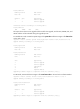
<Sysname> install verify
Active packages on slot 5 are the reference packages.
Packages will be compared with the reference packages.
This operation will take several minutes, please wait...
Verifying packages on chassis 1 slot 4:
Start to check active package completeness.
flash:/boot-a0101.bin verification successful.
flash:/system-a0101.bin verification successful.
Start to check active package consistency.
Active packages are consistent with committed packages on their own board.
Active packages are consistent with the reference packages.
Verifying packages on chassis 1 slot 5:
Start to check active package completeness.
flash:/boot-a0101.bin verification successful.
flash:/system-a0101.bin verification successful.
Start to check active package consistency.
Active packages are consistent with committed packages on their own board.
Active packages are consistent with the reference packages.
Verification is done.
reset install log-history oldest
Use reset install log-history oldest to clear ISSU logs.
Syntax
reset install log-history oldest log-number
Views
User view
Predefined user roles
network-admin
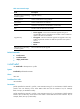
Parameters
log-number: Specifies the number of ISSU logs to be deleted.
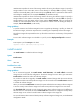
Usage guidelines
This command clears the specified number of logs, beginning with the oldest log.