
R21xx-HP FlexFabric 11900 Fundamentals Command Reference

201
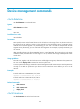
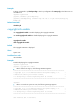
Type : Fan 0
csn : 123456
description : FAN 0
location :
service-date:
department : MKT
state : Normal
custom:
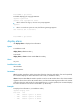
# (In IRF mode) Display the asset ID of fan 0 on IRF member device 1. (The output depends on the actual
settings.)
<Sysname> system-view
[Sysname] display asset-info chassis 1 fan 0 csn
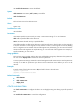
Type : Fan 0
csn : 123456
# (In IRF mode) Display the asset profile of fan 0 on IRF member device 1. (The output depends on the
actual settings.)
<Sysname> system-view
[Sysname] display asset-info chassis 1 fan 0
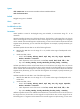
Type : Fan 0
csn : 123456
description : FAN 0
location :
service-date:
department : MKT
state : Normal
custom:
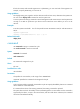
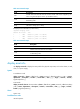
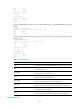
Table 27 Command output
Field Descri
p
tion
Type Asset type, indicating the specified chassis, card, fan or power supply.
csn
Asset ID. If nothing is displayed for this field, it indicates that the asset
ID has not been set.
description
Asset description. If nothing is displayed for this field, it indicates that
the description has not been set.
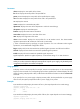
location
Asset location. If nothing is displayed for this field, it indicates that the
location information has not been set.
service-date
Service start date. If nothing is displayed for this field, it indicates that
the service state date of the asset has not been set.
department
Department to which the asset belongs. If nothing is displayed for this
field, it indicates that the department information has not been set.
state
Asset usage state. If nothing is displayed for this field, it indicates that
the usage state has not been set.
custom
Customized asset information. If nothing is displayed for this field, it
indicates that the customized asset information has not been set.
Related commands