
R21xx-HP FlexFabric 11900 Fundamentals Command Reference
13
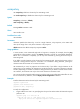
* Copyright (c) 2010-2013 Hewlett-Packard Development Company, L.P. *
* Without the owner's prior written consent, *
* no decompiling or reverse-engineering shall be allowed. *
******************************************************************************
User interface aux0 is available.
Press ENTER to get started.
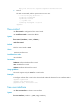
3. Press Enter.
Pressing Enter does not start a session.
4. Enter s.
A terminal session is started.
<Sysname>
authentication-mode
Use authentication-mode to set the authentication mode for a user interface.
Use undo authentication-mode to restore the default.
Syntax
In non-FIPS mode:
authentication-mode { none | password | scheme }
undo authentication-mode
In FIPS mode:
authentication-mode scheme
undo authentication-mode
Default
The authentication mode is password for VTY user interfaces, and none for AUX user interfaces.
Views
User interface view
Predefined user roles
network-admin
Parameters
none: Performs no authentication. This keyword is not supported in FIPS mode.
password: Performs local password authentication. This keyword is not supported in FIPS mode.
scheme: Performs AAA authentication. For more information about AAA, see Security Configuration
Guide.
Usage guidelines
When the authentication mode is none, any user can log in without authentication. To improve device
security, use the password or scheme authentication mode.