
R21xx-HP FlexFabric 11900 Fundamentals Command Reference


203
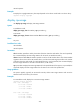
network-operator
Examples
# Display the copyright statement. (The output depends on the device model and is not shown here.)
<Sysname> display copyright
display cpu-usage
Use display cpu-usage to display CPU usage statistics.
Syntax
In standalone mode:
display cpu-usage [ slot slot-number [ cpu cpu-number ] ]
In IRF mode:
display cpu-usage [ chassis chassis-number slot slot-number [ cpu cpu-number ] ]
Views
Any view
Predefined user roles
network-admin
network-operator
Parameters
slot slot-number: Specifies a card by the number of the slot where the card resides. If no card is specified,
this command displays the CPU usage statistics for all cards. (In standalone mode.)
chassis chassis-number slot slot-number: Specifies a card on an IRF member device. The chassis-number
argument refers to the ID of the IRF member device, and the slot-number argument refers to the number
of the slot where the card resides. If no IRF member device or card is specified, this command displays
the CPU usage statistics for all cards in the IRF fabric. (In IRF mode.)
cpu cpu-number: Displays the CPU usage statistics for the specified CPU. If this option is not provided, the
command displays the CPU usage statistics for all CPUs on the card in the specified slot.
Usage guidelines
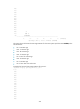
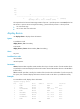
The system regularly (typically at 60-second intervals) collects CPU usage statistics and saves the
statistical results in the history record area.
Examples
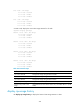
# In standalone mode, display the current CPU usage statistics.
<Sysname> display cpu-usage
Slot 1 CPU 0 CPU usage:
3% in last 5 seconds
0% in last 1 minute
0% in last 5 minutes
Slot 2 CPU 0 CPU usage:
1% in last 5 seconds
1% in last 1 minute
1% in last 5 minutes