
R21xx-HP FlexFabric 11900 Fundamentals Command Reference


215
Predefined user roles
network-admin
network-operator
Parameters
hardware: Displays hardware-related operating statistics.
infrastructure: Displays operating statistics for the fundamental modules.
l2: Displays operating statistics for the Layer 2 features.
l3: Displays operating statistics for the Layer 3 features.
service: Displays operating statistics for upper-layer features.
Usage guidelines
For diagnostics or troubleshooting, you can use separate display commands to collect running status
data module by module or use the display diagnostic-information command to bulk collect running data
for multiple modules.
This display command does not support the | by-linenum option, the > filename option, or the >>
filename option. However, this command asks you whether you want to save the output to a file or
display the output on the screen. The file used to save the output is automatically compressed to save
storage space.
Examples
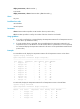
# Display the operating statistics for multiple feature modules in the system.
<Sysname> display diagnostic-information
Save or display diagnostic information (Y=save, N=display)? [Y/N]:n
===============================================
===============display clock===============
11:13:44 UTC Sat 05/11/2013
=================================================
===============display version===============
HP Comware Software, Version 7.1.035, Release 2105
Copyright (c) 2010-2013 Hewlett-Packard Development Company, L.P.
HP 11908-V uptime is 0 weeks, 0 days, 3 hours, 38 minutes
Last reboot reason : Power on
Boot image: flash:/11900-CMW710-BOOT-R2105.bin
Boot image version: 7.1.035P09, Release 2105
System image: flash:/11900-CMW710-SYSTEM-R2105.bin
System image version: 7.1.035, Release 2105
…
display environment
Use display environment to display the temperature statistics for the temperature sensors, including the
current temperature and temperature thresholds.
Syntax
In standalone mode: