
R21xx-HP FlexFabric 11900 Fundamentals Command Reference



224
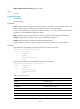
display switch-mode status chassis chassis-number
Views
Any view
Predefined user roles
network-admin
network-operator
Parameters
chassis chassis-number: Displays the operating modes of all cards on an IRF member device. The
chassis-number argument represents the IRF member ID of the switch. (In IRF mode)
|: Filters command output by specifying a regular expression. For more information about regular
expressions, see Fundamentals Configuration Guide.
begin: Displays the first line that matches the specified regular expression and all lines that follow.
exclude: Displays all lines that do not match the specified regular expression.
include: Displays all lines that match the specified regular expression.
regular-expression: Specifies a regular expression, a case-sensitive string of 1 to 256 characters.
Examples
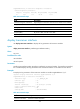
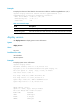
# (In standalone mode) Display the operating mode of all cards on the switch.
<Sysname> display switch-mode status
Slot No. Switch-Mode
1 STANDARD
2 NORMAL
4 MIX-BRIDGING-ROUTING
6 NONE
# (In IRF mode) Display the operating mode of all cards on the switch.
<Sysname>display switch-mode status chassis 1
Slot No. Switch-Mode
1 STANDARD
2 MIX-BRIDGING-ROUTING
4 MIX-BRIDGING-ROUTING
6 NONE
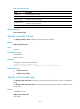
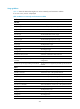
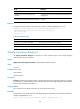
Table 35 Command output
Field Descri
p
tion
Slot No. Card slot number.
Switch-Mode Operating mode of a card.
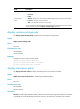
STANDARD Standard operating mode.
ROUTING Route extension mode.
BRIDGING MAC extension mode.
MIX-BRIDGING-ROUTING Mixed extension mode.
STANDARD-IPV6 IPv6 standard mode.