
R21xx-HP FlexFabric 11900 Fundamentals Command Reference
233
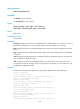
Related commands
reset version-update-record
header
Use header to create a banner.
Use undo header to clear a banner.
Syntax
header { incoming | legal | login | motd | shell } text
undo header { incoming | legal | login | motd | shell }
Views
System view
Predefined user roles
network-admin
Parameters
incoming: Configures the banner to be displayed before a modem dial-up user accesses user view. If
authentication is required, the incoming banner appears after the authentication is passed.
legal: Configures the banner to be displayed before a user inputs the username and password to access
the CLI.
login: Configures the banner displayed to be before password or scheme authentication is performed for
a login user.
motd: Configures the greeting banner to be displayed before the legal banner appears. Support for the
keyword depends on the device model.
shell: Configures the banner to be displayed before a non-modem dial-in user accesses user view.
text: Specifies the banner message, which can be entered in two formats. For more information, see
Fundamentals Configuration Guide.
Examples
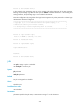
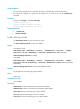
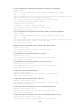
# Create the incoming banner, legal banner, login banner, MOTD banner, and shell banner.
<Sysname> system-view
[Sysname] header incoming
Please input banner content, and quit with the character '%'.
Welcome to incoming(header incoming)%
[Sysname] header legal
Please input banner content, and quit with the character '%'.
Welcome to legal (header legal)%
[Sysname] header login
Please input banner content, and quit with the character '%'.
Welcome to login(header login)%
[Sysname] header motd
Please input banner content, and quit with the character '%'.
Welcome to motd(header motd)%
[Sysname] header shell
Please input banner content, and quit with the character '%'.