
R21xx-HP FlexFabric 11900 Fundamentals Command Reference
238
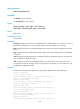
Examples
# Set the minor alarm, severe alarm, critical alarm, and normal state thresholds to 64 MB, 48 MB, 32 MB,
and 96 MB, respectively.
<Sysname> system-view
[Sysname] memory-threshold minor 64 severe 48 critical 32 normal 96
password-recovery enable
Use password-recovery enable to enable password recovery capability.
Use undo password-recovery enable to disable password recovery capability.
Syntax
password-recovery enable
undo password-recovery enable
Default
Password recovery capability is enabled.
Views
System view
Predefined user roles
network-admin
Usage guidelines
Password recovery capability controls console user access to the device configuration and SDRAM from
BootWare menus.
If password recovery capability is enabled, a console user can access the device configuration without
authentication and reconfigure the console login password and user privilege level passwords.
If password recovery capability is disabled, a console user must restore the factory-default configuration
before configuring new passwords. Restoring the factory-default configuration deletes the main and
backup next-startup configuration files.
To enhance system security, disable password recovery capability.
Availability of related BootWare options varies with the password recovery capability setting. For more
information, see the release notes.
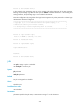
Examples
# Disable password recovery capability.
<Sysname> system-view
[Sysname] undo password-recovery enable
reboot
Use reboot to reboot a card or the entire system. (In standalone mode.)
Use reboot to reboot an IRF member device or all IRF member devices. (In IRF mode.)
Syntax
In standalone mode: