
R21xx-HP FlexFabric 11900 Fundamentals Command Reference

239
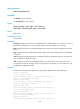
reboot [ slot slot-number ] [ force ]
In IRF mode:
reboot [ chassis chassis-number [ slot slot-number] ] [ force ]
Default
The default setting depends on the device model.
Views
User view
Predefined user roles
network-admin
Parameters
chassis chassis-number: Specifies an IRF member device by its chassis number. (In IRF mode.)
slot slot-number: Specifies a card by the number of the slot where the card resides.
force: Reboots the device immediately without performing any software check. If this keyword is not
specified, the system checks, for example, whether the main system software image file exists and
whether the hard disk is not being written. If any circumstance might affect data protection, the system
does not reboot the device.
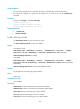
Usage guidelines
CAUTION:
• Device reboot interrupts network services.
• If the main startup software images are corrupted or missing, you must specify a set of main startup
software images again before using the reboot command to reboot the device. Otherwise, the device
cannot start up.
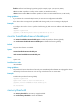
For data security, the device does not reboot if you reboot the device while the device is performing file
operations.
In standalone mode, this command reboots the device if no card is specified.
In IRF mode:
• If neither an IRF member device nor a card is specified, this command reboots all IRF member
devices.
• If an IRF member device is specified but no card is specified, this command reboots the specified IRF
member device.
• If both an IRF member device and a card are specified, this command reboots the specified card in
the IRF fabric.
Examples
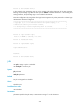
# Reboot the device when no configuration change has occurred since the last time you saved the
running configuration.
<Sysname> reboot
Start to check configuration with next startup configuration file, please
wait.........DONE!
This command will reboot the device. Continue? [Y/N]:y
Now rebooting, please wait...