
R21xx-HP FlexFabric 11900 Fundamentals Command Reference

20
display users
Use display users to display information about the user interfaces that are being used.
Use display users all to display information about all user interfaces that are supported by the device.
Syntax
display users [ all ]
Views
Any view
Predefined user roles
network-admin
network-operator
Parameters
all: Displays information about all user interfaces supported by the device.
Examples
# Display information about the user interfaces being used.
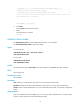
<Sysname> display users
Idx UI Idle Time Pid Type
10 VTY 0 00:10:49 Jun 11 11:27:32 320 TEL
+ 11 VTY 1 00:00:00 Jun 11 11:39:40 334 TEL
Following are more details.
VTY 0 :
Location: 192.168.1.12
VTY 1 :
Location: 192.168.1.26
+ : Current operation user.
F : Current operation user works in async mode.
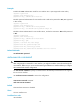
The output shows that two users have logged in to the device: one is using user interface VTY 0 and the
other is using VTY 1. The one using VTY 0 is at 192.168.1.12 and the other one (yourself) is at
192.168.1.26.
Table 3 Command output
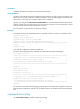
Field Description
Idx Absolute number of the user interface.
UI Type and relative number of the user interface.
Delay Time elapsed after the user's last input, in the format hh:mm:ss.
Type User type, such as Telnet or SSH.
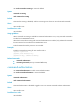
+ Indicates the user interface you are using.
Location IP address of the user.
F The current user is operating in asynchronous mode.