
R21xx-HP FlexFabric 11900 Fundamentals Command Reference
37
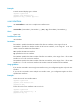
Examples
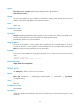
# Set the terminal display type to VT100.
<Sysname> system-view
[Sysname] user-interface vty 0
[Sysname-ui-vty0] terminal type vt100
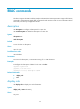
user-interface
Use user-interface to enter one or multiple user interface views.
Syntax
user-interface { first-number1 [ last-number1 ] | { aux | vty } first-number2 [ last-number2 ] }
Views
System view
Predefined user roles
network-admin
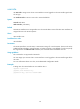
Parameters
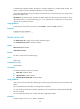
first-number1: Specifies the absolute number of the first user interface, in the range of 0 to 23
last-number1: Specifies the absolute number of the last user interface, in the range of 1 to 23. This
number cannot be smaller than first-number1.
aux: Specifies the AUX user interface.
vty: Specifies the VTY user interface.
first-number2: Specifies the relative number of the first user interface, in the range of 0 to 1 for an AUX
interface or 0 to 15 for a VTY user interface.
last-number2: Specifies the relative number of the last user interface, in the range of 0 to 1 for an AUX
interface or 1 to 15 for a VTY user interface. This number cannot be smaller than first-number2.
Usage guidelines
If you use this command to enter a single user interface view, your configuration applies only to the user
interface.
If you use this command to enter multiple user interface views, your configuration applies to all the
specified user interfaces.
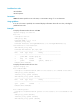
Examples
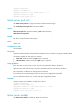
# Enter the view of user interface AUX 0.
<Sysname> system-view
[Sysname] user-interface aux 0
[Sysname-ui-aux0]
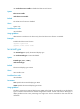
# Enter the views of user interfaces VTY 0 to VTY 15.
<Sysname> system-view
[Sysname] user-interface vty 0 15
[Sysname-ui-vty0-15]