
R21xx-HP FlexFabric 11900 Fundamentals Command Reference

59
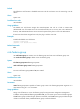
feature [ feature-name ]: Specifies one or all features. The feature-name argument specifies a feature
name. If no feature name is specified, you specify all the features in the system. When you specify a
feature, you must enter its name exactly as displayed by display role feature, including the case.
feature-group feature-group-name: Specifies a user-defined or pre-defined feature group. The
feature-group-name argument represents the feature group name, a case-sensitive string of 1 to 31
characters. If the feature group has not been created, the rule takes effect after the group is created. To
display the feature groups that have been created, use the display role feature-group command.
all: Deletes all the user role rules.
Usage guidelines
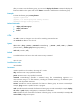
You can define the following types of rules for different access control granularities:
• Command rule—Controls access to a command or a set of commands that match a regular
expression.
• Feature rule—Controls access to the commands of a feature by command type.
• Feature group rule—Controls access to the commands of a group of features by command type.
You can configure up to 256 rules for a user role, but the total number of user role rules in the system
cannot exceed 1024.
A user role can access the set of permitted commands specified in its rules. If two rules conflict, the one
with the higher ID takes effect. For example, if rule 1 permits the ping command, rule 2 permits the tracert
command, and rule 3 denies the ping command, the user role can use the tracert command but not the
ping command.
Any rule modification, addition, or removal for a user role takes effect only on the users that log in with
the user role after the change.
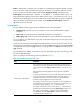
When you specify a command string, follow the guidelines in Table 6.
Table 6 Command stri
ng configuration rules
Rule Guidelines
Semicolon (;) is the delimiter.
Use a semicolon to separate the command of each view that you must
enter before you access a command or a set of commands, except for the
commands (for example, display and dir) available in user view or any
view.
Each semicolon-separated segment must have at least one printable
character.
To specify the commands in a view but not the commands in its subviews,
use a semicolon as the last printable character in the last segment. To
specify the commands in a view and its subviews, the last printable
character in the last segment must not be a semicolon.
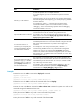
For example, you must enter system view before you enter interface view.
To specify all the commands that start with ip in any interface view, you
must use the "system ; interface * ; ip * ;" command string.
For another example, the "system ; radius scheme * ;" command string
represents all the commands that start with radius scheme in system view.
The "system ; radius scheme *" command string represents all the
commands that start with radius scheme in system view and all the
commands in RADIUS scheme view.