
R21xx-HP FlexFabric 11900 Fundamentals Command Reference


63
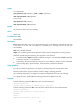
Syntax
In non-FIPS mode:
super password [ role rolename ] [ { hash | simple } password ]
undo super password [ role rolename ]
In FIPS mode:
super password [ role rolename ]
undo super password [ role rolename ]
Default
No password is set for user role switching.
Views
System view
Predefined user roles
network-admin
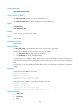
Parameters
role rolename: Specifies a user role, a case-sensitive string of 1 to 63 characters. The user role must exist
in the system. If no user role is specified, this command sets a switching password for user role
network-admin.
hash: Sets a hashed password.
simple: Sets a plaintext password. This password will be saved in hashed text for security purposes.
password: Specifies the password string. This argument is case sensitive.
• In non-FIPS mode, if simple is specified, it must be a string of 1 to 63 characters. If hash is specified,
it must be a string of 1 to 110 characters.
• In FIPS mode, the password must be a string of 15 to 63 characters, and must contain 4 character
types including digits, uppercase letters, lowercase letters, and special characters.
Usage guidelines
If you do not specify any parameters, you specify a plaintext password in the interactive mode.
The FIPS mode supports only the interactive mode for setting a switching password.
Set a switching password if you configure local password authentication for user role switching.
It is a good practice to specify different switching passwords for different user roles.
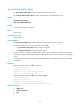
Examples
# Set the switching password to abc for the user role network-operator.
<Sysname> system-view
[Sysname] super password role network-operator simple abc
# Set the switching password to abc in the interactive mode for the user role network-operator
<Sysname> system-view
[Sysname] super password role network-operator
Password:
Confirm :
Updating user information. Please wait... ...