
R21xx-HP FlexFabric 11900 Fundamentals Command Reference
80
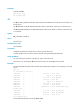
Password:
230 Logged in successfully
Remote system type is MSDOS.
ftp>
ftp client source
Use ftp client source to specify the source IPv4 address for FTP packets sent by the FTP client.
Use undo ftp client source to restore the default.
Syntax
ftp client source { interface interface-type interface-number | ip source-ip-address }
undo ftp client source
Default
No source IP address is configured for sent FTP packets. The device uses the primary IP address of the
output interface of the route to the server as the source IP address.
Views
System view
Predefined user roles
network-admin
Parameters
interface interface-type interface-number: Specifies the source interface for establishing FTP connections.
The primary IP address of the source interface is used as the source IP address of packets sent to a FTP
server. Make sure the interface is up and has the primary IP address configured. Otherwise, the
transmission fails.
ip source-ip-address: Specifies the source IP address of sent FTP packets. The source address must be an
IP address that has been configured on the device, and its interface must be up. Otherwise, the
transmission fails.
Usages guidelines
If you execute this command multiple times, the most recent configuration takes effect.
The source address specified with the ftp command takes precedence over the one specified with the ftp
client source command.
The source IP address specified with the ftp client source command applies to all FTP connections while
the one specified with the ftp command applies only to the current FTP connection.
Examples
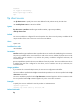
# Specify the source IP address for sent FTP packets as 192.168.20.222.
<Sysname> system-view
[Sysname] ftp client source ip 192.168.20.222
Related commands
ftp