
R21xx-HP FlexFabric 11900 Fundamentals Command Reference
83
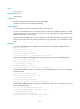
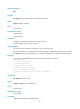
Views
FTP client view
Predefined user roles
network-admin
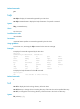
Parameters
remotefile: Specifies the name of the file to be downloaded.
localfile: Specifies a name for the downloaded file.
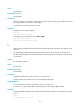
Usage guidelines
You can perform this operation only after you log in to the FTP server.
To save the downloaded file to the working directory accessed by the ftp command, the localfile
argument must specify a file name such as a.cfg. If you do not provide the localfile argument, the
downloaded file uses its original name.
To save the downloaded file to some other directory, the localfile argument must specify the target
directory plus the file name such as flash:/subdirectory/a.cfg. Otherwise, the command fails to take
effect.
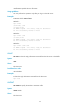
Examples
# Download file a.txt and save it as b.txt in the working directory accessed by the ftp command.
ftp> get a.txt b.txt
local: b.txt remote: a.txt
150 Connecting to port 47457
226 File successfully transferred
1569 bytes received in 0.00527 seconds (290.6 kbyte/s)
# Download file a.txt to the folder test under the working directory accessed by the ftp command.
ftp> get a.txt flash:/test/b.txt
local: flash:/test/b.txt remote: a.txt
150 Connecting to port 47457
226 File successfully transferred
1569 bytes received in 0.00527 seconds (290.6 kbyte/s)
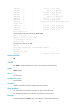
# Download file a.txt to the Flash root directory of the standby MPU (in slot 1) and save it as c.txt. (In
standalone mode.)
ftp> get a.txt slot1#flash:/c.txt
local: slot1#flash:/c.txt remote: a.txt
150 Connecting to port 47460
226 File successfully transferred
1569 bytes received in 0.0564 seconds (27.2 kbyte/s)
# Download file a.txt to the Flash root directory of the MPU that resides in slot 1 of member device 1, and
save it as c.txt. (IRF mode.)
ftp> get a.txt chassis1#slot1#flash:/c.txt
local: chassis1#slot1#flash:/c.txt remote: a.txt
150 Connecting to port 47460
226 File successfully transferred
1569 bytes received in 0.0564 seconds (27.2 kbyte/s)