
R21xx-HP FlexFabric 11900 Fundamentals Configuration Guide

94
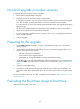
Task Command
Remarks
Load the upgrade BootWare
image from the flash to the Normal
area of BootWare.
• In standalone mode:
bootrom update file file-url slot
slot-number-list
• In IRF mode:
bootrom update file file-url
chassis chassis-number slot
slot-number-list
Specify the downloaded software
image file for the file-url argument.
When executing this command, the
device examines the upgrade
BootWare image for version and
hardware compatibility. If the
image is incompatible with the
device, the upgrade fails.
The new BootWare image takes
effect at a reboot.
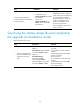
Specifying the startup image file and completing
the upgrade (in standalone mode)
Perform this task in user view.
Ste
p
Command
Remarks
1. Specify the upgrade file as
the main or backup startup
image file for the active
MPU.
Method 1:
boot-loader file ipe-filename slot
slot-number { backup | main }
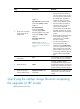
Method 2:
boot-loader file boot
boot-package system
system-package [ feature
feature-package&<1-30> ] slot
slot-number { backup | main }
You can also specify a backup startup
image file.
To use method 1, the file name must
take the
storage-medium:/base-filename.ipe
format, for example,
flash:/startup.ipe.
To use method 2, all file names must
take the
storage-medium:/base-filename.bin
format, for example,
flash:/startup-boot.bin.