
R21xx-HP FlexFabric 11900 Fundamentals Configuration Guide

102
forwarding packets. After startup, the CPU continues to provide services on the basis of the saved
system information. For services that require regular protocol message exchanges to maintain
connections, this method starts protocol agents to meet the requirements.
Compared with an incremental upgrade, an ISSU reboot upgrade affects all modules that use the
CPU and takes a longer time.
• Reboot (in standalone mode):
A reboot upgrade reboots cards to load the new software.
If the device has two MPUs and both MPUs need to be rebooted for upgrade, upgrade the standby
MPU first to implement in-service upgrade. If the device has only one MPU, service disruption is
unavoidable during the upgrade.
Specially, the upgrade method of a switching fabric card might be Sequence Reboot.
• Reboot (in IRF mode):
A reboot upgrade reboots cards to load the new software.
If a member device of the IRF fabric has two MPUs and both MPUs need to be rebooted for
upgrade, upgrade the standby MPU first to implement in-service upgrade. If the IRF fabric has only
one MPU, service disruption is unavoidable during the upgrade.
Specially, the upgrade method of a switching fabric card might be Sequence Reboot.
ISSU command series
To perform an ISSU, you can use either of the install series commands or the issu series commands.
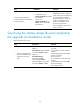
Table 13 Comparison between the two command series
Item issu series commands
install
series commands
Required compatibility
between the old and new
software versions
Compatible or incompatible. Compatible.
Support installing and
uninstalling patches?
No. Yes.
Upgrade mode
Upgrade an IRF fabric as per
member device.
Advanced upgrade mode, upgrade the
system as per MPU.
Effect scope of the
upgrade operation
Large. Small.
Technical skill
requirements
Low. Suitable for most
administrators.
High. Administrators must have a
profound understanding of the system and
the effects of each upgrade action.
Recommended for
common administrators?
Yes. No.
ISSU prerequisites
• Read the software release notes to determine which software images need to be upgraded,
whether these software images are compatible with one another, and whether these software
images are compatible with the software images running on the device. Then, based on the
compatibility, determine the command series to use.