
R21xx-HP FlexFabric 11900 Fundamentals Configuration Guide


105
Performing an ISSU by using issu series
commands
Performing an ISSU in standalone mode
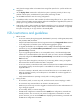
When you use the issu series commands to install or upgrade the software of MPUs, the device
automatically install or upgrade the software of the LPUs and switching fabric cards as needed. You do
not need to install or upgrade the software of the LPUs and switching fabric cards separately.
The ISSU procedure varies depending on whether the device has a single or two MPUs.
Performing an ISSU for a dual-MPU device
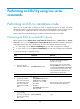
Before upgrade, use the display version comp-matrix file { boot filename | system filename | feature
filename&<1-30> } * or the display version comp-matrix file ipe ipe-filename command to display the
compatibility between the new and old images as well as the upgrade methods to be used:
• If a new image is on the Version compatibility list, the new and old images are compatible.
• If a new image is not on the Version compatibility list, the new and old images are incompatible.
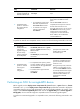
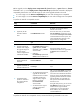
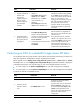
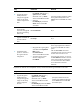
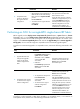
To perform an ISSU for a compatible version:
Ste
p
Command
Remarks
1. Enter system view.
system-view N/A
2. (Optional.) Set the
automatic rollback timer.
issu rollback-timer minutes
By default, the automatic-rollback
interval is 45 minutes.
This timer starts when you execute the
issu run switchover command. If you do
not execute the issu accept or issu commit
command before this timer expires, the
system automatically rolls back to the
original software configuration.
3. Return to user view.
quit N/A
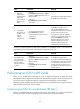
4. Upgrade the standby
MPU and configure the
upgrade images as the
main startup software
images for the standby
MPU.
• Method 1:
issu load file { boot filename |
system filename | feature
filename&<1-30> } * slot
slot-number
• Method 2:
issu load file ipe ipe-filename
slot slot-number
Specify the slot number of the standby
MPU for the slot slot-number option.
5. Perform an
active/standby
switchover and upgrade
the LPUs and switching
fabric cards.
issu run switchover N/A