
R21xx-HP FlexFabric 11900 Fundamentals Configuration Guide

4
format
free
ftp
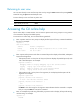
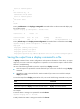
<Sysname> display ftp?
ftp
ftp-server
ftp-user
Using the undo form of a command
Most configuration commands have an undo form for canceling a configuration, restoring the default, or
disabling a feature. For example, the info-center enable command enables the information center, and
the undo info-center enable command disables the information center.
Entering a command
When you enter a command, you can use keys or hotkeys to edit the command line, or use abbreviated
keywords or keyword aliases.
Editing a command line
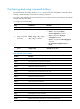
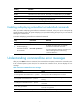
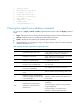
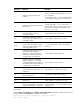
To edit a command line, use the keys listed in Table 1 or the hotkeys listed in Table 2. When you are
finished, you can press Enter to execute the command.
Table 1 Command line editing keys
Ke
y
s Function
Common keys
If the edit buffer is not full, pressing a common key inserts a character at the
position of the cursor and moves the cursor to the right. The edit buffer can
store up to 511 characters. Unless the buffer is full, all common characters
that you enter before pressing Enter are saved in the edit buffer.
Backspace
Deletes the character to the left of the cursor and moves the cursor back one
character.
Left arrow key (
←
) Moves the cursor one character to the left.
Right arrow key (
→
) Moves the cursor one character to the right.
Up arrow key (
↑
) Gets the last history command.
Down arrow key (
↓
) Gets the next history command.
Tab
If you press Tab after entering part of a keyword, the system automatically
completes the keyword:
• If a unique match is found, the system displays the complete keyword.
• If there is more than one match, press Tab multiple times to pick the
keyword you want to enter.
• If there is no match, the system does not modify what you entered but
displays it again in the next line.