
R21xx-HP FlexFabric 11900 Fundamentals Configuration Guide


112
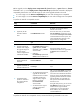
Task Command
Remarks
Upgrade the MPU and
configure the upgrade
images as the startup
software images for the
MPU.
• Method 1:
issu load file { boot filename | system
filename | feature filename&<1-30> } *
chassis chassis-number slot slot-number
• Method 2:
issu load file ipe ipe-filename chassis
chassis-number slot slot-number
Specify the member ID and slot
number of the only MPU for the
chassis chassis-number slot
slot-number option.
This single command starts and
finishes the ISSU process. When
this command is completed, the
ISSU process ends and the ISSU
status transitions to Init. No
rollback can be performed during
the ISSU process.
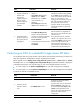
Displaying and maintaining ISSU
Execute display commands in any view and reset commands in user view.
In standalone mode:
Task Command
Display version compatibility
information.
display version comp-matrix
Display ISSU status information. display issu state
Display automatic-rollback timer
information.
display issu rollback-timer
Display active software images. display install active [ slot slot-number ] [ verbose ]
Display inactive software images. display install inactive [ slot slot-number ] [ verbose ]
Display main startup software
images.
display install committed [ slot slot-number ] [ verbose ]
Display backup startup software
images.
display install backup [ slot slot-number ] [ verbose ]
Display ISSU logs. display install log [ log-id ] [ verbose ]
Display software image file
information.
display install package { filename | all } [ verbose ]
Display the software images
included in a .ipe file.
display install ipe-info ipe-file
Display all software image files
that include a specific component
or file.
display install which { component name | file filename } [ slot slot-number ]
Clear ISSU logs. reset install log-history oldest log-number
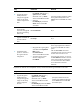
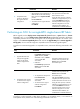
In IRF mode:
Task Command
Display version compatibility
information.
display version comp-matrix