
R21xx-HP FlexFabric 11900 Fundamentals Configuration Guide




131
Ste
p
Command
Remarks
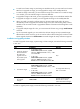
1. Activate the patch
images.
• In standalone mode:
install activate patch filename slot slot-number
• In IRF mode:
install activate patch filename chassis
chassis-number slot slot-number
An image takes effect only
after it is activated.
2. (Optional.)
Confirm the
software changes.
install commit
To keep activated images
effective after a reboot, you
must confirm the software
changes.
Uninstalling feature or patch images
You can uninstall only feature images and patch images from the device. Boot and system images cannot
be uninstalled.
Uninstalled images are still saved on the storage medium. To permanently remove the images from the
device, execute the install remove command.
To uninstall an image, deactivate it and then confirm the software change. If you do not confirm the
deactivation, the deactivated image will become active after a reboot.
To uninstall feature images, execute the following commands in user view:
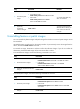
Ste
p
Command
1. Deactivate feature images.
• In standalone mode:
install deactivate feature filename&<1-30> slot slot-number
• In IRF mode:
install deactivate feature filename&<1-30> chassis
chassis-number slot slot-number
2. (Optional.) Confirm the software
changes.
install commit
To uninstall patch images, execute the following commands in user view:
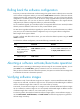
Ste
p
Command
1. Deactivate patch images.
• In standalone mode:
install deactivate patch filename slot slot-number
• In IRF mode:
install deactivate patch filename chassis chassis-number slot
slot-number
2. (Optional.) Confirm the software
changes.
install commit