
R21xx-HP FlexFabric 11900 Fundamentals Configuration Guide

6
Configuring and using command hotkeys
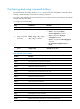
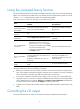
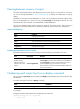
The system defines the hotkeys shown in Table 2 and provides five configurable command hotkeys.
Pressing a command hotkey is the same as entering a command.
If a hotkey is also defined by the terminal software you are using to interact with the device, the terminal
software definition takes effect.
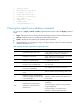
To configure a command hotkey:
Ste
p
Command
Remarks
1. Enter system view.
system-view N/A
2. Assign a command
to a hotkey.
hotkey { ctrl_g | ctrl_l | ctrl_o |
ctrl_t | ctrl_u } command
By default:
• Ctrl+G is assigned the display
current-configuration command.
• Ctrl+L is assigned the display ip
routing-table command.
• Ctrl+O is assigned the undo debugging all
command.
• No command is assigned to Ctrl+T or
Ctrl+U.
3. (Optional.) Display
hotkeys.
display hotkey Available in any view.
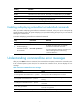
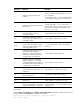
Table 2 System-reserved hotkeys
Hotke
y
Function
Ctrl+A Moves the cursor to the beginning of a line.
Ctrl+B Moves the cursor one character to the left.
Ctrl+C Stops the current command.
Ctrl+D Deletes the character at the cursor.
Ctrl+E Moves the cursor to the end of a line.
Ctrl+F Moves the cursor one character to the right.
Ctrl+H Deletes the character to the left of the cursor.
Ctrl+K
Aborts the connection request.
Ctrl+R Redisplays the current line.
Ctrl+V Pastes text from the clipboard.
Ctrl+W Deletes the word to the left of the cursor.
Ctrl+X Deletes all characters to the left of the cursor.
Ctrl+Y Deletes all characters to the right of the cursor.
Ctrl+Z Returns to user view.
Ctrl+] Terminates the current connection.
Esc+B Moves the cursor back one word.
Esc+D Deletes all characters from the cursor to the end of the word.