
R21xx-HP FlexFabric 11900 Fundamentals Configuration Guide




132
Rolling back the software configuration
Every time you activate or deactivate a software image, the system creates a rollback point to record the
current software configuration. Before you execute the install commit command to confirm the software
changes (executing this command also removes all rollback points), you can roll back the software
configuration to a rollback point to cancel all software image upgrade-related operations performed
after the rollback point. You can also roll back the software configuration to the original software
configuration (the software configuration before you performed the ISSU).
For an incremental upgrade, up to 50 rollback points are supported. After the limit is reached, the oldest
rollback points are deleted to make room for newly created rollback points.
For ISSU reboot upgrades and reboot upgrades, the system does not record and maintain any rollback
point, and you can roll back the software configuration only to the original software configuration.
Patch images do not support rollback.
To make a rollback take effect after a reboot, you must confirm the rollback operation using the install
commit command.
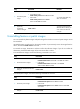
To roll back the software configuration, execute the following commands in user view:
Ste
p
Command
Remarks
1. Roll back the software
configuration to an
earlier rollback point or
the original software
configuration.
install rollback to { point-id |
original }
To view available rollback points, use
the display install rollback command.
2. (Optional.) Confirm the
software changes.
install commit N/A
Aborting a software activate/deactivate operation
When the system is activating or deactivating a software image for an incremental upgrade, you can
press Ctrl+C or use the install abort [ job-id ] command in user view to abort the operation.
After you abort a software activate or deactivate operation, the system runs with the software images that
it used before the activate or deactivate operation.
Verifying software images
In standalone mode, if some software images are not integral or some activated/deactivated software
images are not confirmed, a switchover might not occur as expected, and the MPUs might run different
versions of software images after a reboot or even cannot restart up correctly.
In IRF mode, if some software images are not integral or some activated/deactivated software images
are not confirmed, a switchover might not occur as expected, and the MPUs might run different versions
of software images after a reboot or even cannot restart up correctly.
To solve the problem, download and install the software images again to ensure software integrity, or
use the install activate, install deactivate, and install commit commands as appropriate to guarantee
software image consistency.