
R21xx-HP FlexFabric 11900 Fundamentals Configuration Guide

133
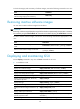
To check the integrity and consistency of software images, execute the following command in user view:
Task Command
Verify the software change confirmation status and
software image integrity and consistency.
install verify
Removing inactive software images
You can remove inactive software images from the device.
IMPORTANT:
Removin
g
a software ima
g
e deletes the ima
g
e file from the device permanently. This operation can neither
be reverted by using the install rollback to command nor be aborted by using the install abort command.
To remove inactive software images, execute one of the following commands as appropriate in user
view:
Task Command
Remove inactive software images in standalone
mode.
install remove [ slot slot-number ] { package | inactive }
Remove inactive software images in IRF mode.
install remove [ chassis chassis-number slot slot-number ]
{ package | inactive }
Displaying and maintaining ISSU
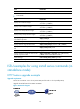
Execute display commands in any view and reset commands in user view.
• In standalone mode:
Task Command
Display active software images. display install active [ slot slot-number ] [ verbose ]
Display inactive software images. display install inactive [ slot slot-number ] [ verbose ]
Display main startup software images. display install committed [ slot slot-number ] [ verbose ]
Display backup startup software images. display install backup [ slot slot-number ] [ verbose ]
Display ongoing ISSU activate, deactivate,
and rollback operations.
display install job
Display ISSU logs. display install log [ log-id ] [ verbose ]
Display software image file information. display install package { filename | all } [ verbose ]
Display the software images included in a .ipe
file.
display install ipe-info ipe-file
Display rollback point information. display install rollback [ point-id ]
Display all software image files that include a
specific component or file.
display install which { component name | file filename } [ slot
slot-number ]
Clear ISSU logs. reset install log-history oldest log-number