
R21xx-HP FlexFabric 11900 Fundamentals Configuration Guide
135
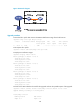
Upgrade procedure
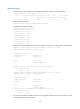
# Download the .ipe file that contains the R0202 HTTP feature image from the TFTP server.
<Sysname> tftp 2.2.2.2 get http-r0202.ipe
% Total % Received % Xferd Average Speed Time Time Time Current
Dload Upload Total Spent Left Speed
100 256k 100 256k 0 0 764k 0 --:--:-- --:--:-- --:--:-- 810k
# Decompress the .ipe file.
<Sysname> install add flash:/http-r0202.ipe flash:/
# Display active software images.
<Sysname> display install active
Active packages on slot 4:
flash:/boot-r0201.bin
flash:/system-r0201.bin
flash:/http-r0201.bin
Active packages on slot 5:
flash:/boot-r0201.bin
flash:/system-r0201.bin
flash:/http-r0201.bin
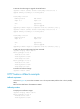
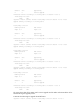
# Check for the ISSU methods to be used for the upgrade and view the possible impact of the upgrade.
<Sysname> install activate feature flash:/http-r0202.bin slot 5 test
Upgrade summary according to following table:
flash:/http-r0202.bin
Running Version New Version
Alpha 0201 Alpha 0202
Slot Upgrade Way
5 Service Upgrade
Influenced service according to following table on slot 5:
flash:/http-r0202.bin
HTTP CFA
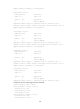
<Sysname> install activate feature flash:/http-r0202.bin slot 4 test
Upgrade summary according to following table:
flash:/http-r0202.bin
Running Version New Version
Alpha 0201 Alpha 0202
Slot Upgrade Way
4 Service Upgrade
Influenced service according to following table on slot 4:
flash:/http-r0202.bin
HTTP CFA
The output shows that both MPUs need a service upgrade and the HTTP and CFA modules will be
rebooted during the upgrade process.