
R21xx-HP FlexFabric 11900 Fundamentals Configuration Guide
136
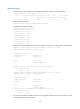
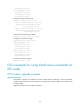
# Activate the HTTP image to upgrade the HTTP feature.
<Sysname> install activate feature flash:/http-r0202.bin slot 5
Upgrade summary according to following table:
flash:/http-r0202.bin
Running Version New Version
Alpha 0201 Alpha 0202
Slot Upgrade Way
5 Service Upgrade
Upgrading software images to compatible versions. Continue? [Y/N]: y
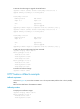
<Sysname> install activate feature flash:/http-r0202.bin slot 4
Upgrade summary according to following table:
flash:/http-r0202.bin
Running Version New Version
Alpha 0201 Alpha 0202
Slot Upgrade Way
4 Service Upgrade
Upgrading software images to compatible versions. Continue? [Y/N]: y
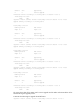
# Verify that the new HTTP image has been activated.
<Sysname> display install active
Active packages on slot 4:
flash:/boot-r0201.bin
flash:/system-r0201.bin
flash:/http-r0202.bin
Active packages on slot 5:
flash:/boot-r0201.bin
flash:/system-r0201.bin
flash:/http-r0202.bin
# Confirm the software change.
<Sysname> install commit
HTTP feature rollback example
Rollback requirement
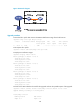
As shown in Figure 44, Device has two MPUs: one in slot 4 (active MPU) and the other in slot 5 (standby
MPU).
Roll back the HTTP feature from R0202 to R0201.
Rollback procedure
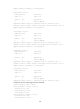
# Display active software images.
<Sysname> display install active
Active packages on slot 4:
flash:/boot-r0201.bin
flash:/system-r0201.bin