
R21xx-HP FlexFabric 11900 Fundamentals Configuration Guide

7
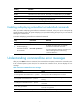
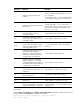
Hotke
y
Function
Esc+F Moves the cursor forward one word.
Esc+N Moves the cursor down one line. This hotkey is available before you press Enter.
Esc+P Moves the cursor up one line. This hotkey is available before you press Enter.
Esc+< Moves the cursor to the beginning of the clipboard.
Esc+> Moves the cursor to the ending of the clipboard.
Enabling redisplaying entered-but-not-submitted commands
After you enable redisplaying entered-but-not-submitted commands, when your input is interrupted by
system information output, the system redisplays your input after finishing the output so you can continue
entering the command line.
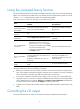
To enable redisplaying entered-but-not-submitted commands:
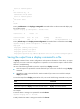
Step Command Remarks
1. Enter system view.
system-view N/A
2. Enable redisplaying
entered-but-not-submit
ted commands.
info-center synchronous
By default, the system does not redisplay
entered-but-not-submitted commands.
For more information about this command, see
Network Management and Monitoring
Command Reference.
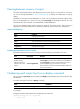
Understanding command-line error messages
After you press Enter to submit a command, the command line interpreter examines the command syntax.
If the command passes syntax check, the CLI executes the command. If not, the CLI displays an error
message.
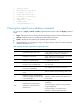
Table 3 Common command-line error messages
Error messa
g
e Cause
% Unrecognized command found at '^' position.
The keyword in the marked position is invalid.
% Incomplete command found at '^' position.
One or more required keywords or arguments are
missing.
% Ambiguous command found at '^' position.
The entered character sequence matches more than one
command.
% Too many parameters.
The entered character sequence contains excessive
keywords or arguments.
% Wrong parameter found at '^' position. The argument in the marked position is invalid.