
R21xx-HP FlexFabric 11900 Fundamentals Configuration Guide

149
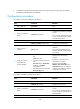
Step Command Remarks
5. Create a schedule.
scheduler schedule schedule-name By default, no schedule exists.
6. Assign a job to a
schedule.
job job-name
By default, no job is assigned to a
schedule.
You can assign multiple jobs to a
schedule. The jobs will be executed
concurrently.
7. Specify an execution
time table for the
periodic schedule
• Execute the schedule at an interval
from the specified time on:
time repeating at time
[ month-date [ month-day | last ] |
week-day week-day&<1-7> ]
•
Execute the schedule at the
specified time on every specified
day in a month or week:
time repeating [ at time [date ] ]
interval interval-time
Configure either command.
By default, no execution time is
specified for a schedule.
Executing commands clock
datetime, clock summer-time, and
clock timezone does not change the
execution time table that is already
configured for a schedule.
Schedule configuration example
Network requirements
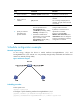
To save energy, configure the device to enable interfaces Ten-GigabitEthernet 1/0/1 and
Ten-GigabitEthernet 1/0/2 at 8:00 a.m. every Monday through Friday and disable the interfaces at
18:00 every Monday through Friday.
Figure 46 Network diagram
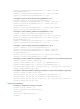
Scheduling procedure
# Enter system view.
<Sysname> system-view
# Configure a job for disabling interface Ten-GigabitEthernet 1/0/1.
[Sysname] scheduler job shutdown-Ten-GigabitEthernet1/0/1
[Sysname-job-shutdown-Ten-GigabitEthernet1/0/1] command 1 system-view