
R21xx-HP FlexFabric 11900 Fundamentals Configuration Guide

152
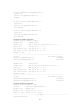
System View: return to User View with Ctrl+Z.
[Sysname]interface ten-gigabitEthernet1/0/1
[Sysname-Ten-GigabitEthernet1/0/1]undo shutdown
Job name : start-Ten-GigabitEthernet1/0/2
Schedule name : START-pc1/pc2
Execution time : Wed Sep 28 08:00:00 2011
Completion time : Wed Sep 28 08:00:02 2011
--------------------------------- Job output -----------------------------------
<Sysname>system-view
System View: return to User View with Ctrl+Z.
[Sysname]interface ten-gigabitethernet1/0/2.
[Sysname-Ten-GigabitEthernet1/0/2]undo shutdown
Job name : shutdown-Ten-GigabitEthernet1/0/1
Schedule name : STOP-pc1/pc2
Execution time : Wed Sep 28 18:00:00 2011
Completion time : Wed Sep 28 18:00:01 2011
--------------------------------- Job output -----------------------------------
<Sysname>system-view
System View: return to User View with Ctrl+Z.
[Sysname]interface ten-gigabitethernet1/0/1
[Sysname-Ten-GigabitEthernet1/0/1]shutdown
Job name : shutdown-Ten-GigabitEthernet1/0/2
Schedule name : STOP-pc1/pc2
Execution time : Wed Sep 28 18:00:00 2011
Completion time : Wed Sep 28 18:00:01 2011
--------------------------------- Job output -----------------------------------
<Sysname>system-view
System View: return to User View with Ctrl+Z.
[Sysname]interface ten-gigabitethernet1/0/2
[Sysname-Ten-GigabitEthernet1/0/2]shutdown
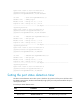
Setting the port status detection timer
The device starts a detection timer when a port is shut down by a protocol. If the port is still down when
the detection timer expires, the device automatically brings up the port so the port status reflects the port's
actual physical status.
To set the port status detection timer:
Step Command Remarks
1. Enter system view.
system-view N/A
2. Set the port status
detection timer.
shutdown-interval time The default setting is 30 seconds.